 French
 German
 Italian
 Spanish
 Russian
 Turkish
 Portuguese
 Japanese
 Dutch
Dutch Polish
 Korean
 Chinese (Simplified)
 Chinese (Traditional)
How to download Bilibili videos in HD quality on Mac and PC
Bilibili is the go-to video site in China - huge for anime, gaming, and music content. Saving videos from it isn't as simple as right-clicking: the site uses DASH streaming with separate video and audio tracks, and the servers reject requests without the right headers. YouTube Downloader handles all of that. Just give it a Bilibili link and the program delivers a normal MP4 with the best quality available.
The screenshots were taken using the Mac version of the program, but the application looks almost the same on Windows and Linux.
-
Get the Bilibili link
Open the video on bilibili.com. The URL in the address bar will look like bilibili.com/video/BV1xx... - copy it. If the video has numbered parts (P1, P2...), make sure you're on the part you want.

-
Feed it to the downloader
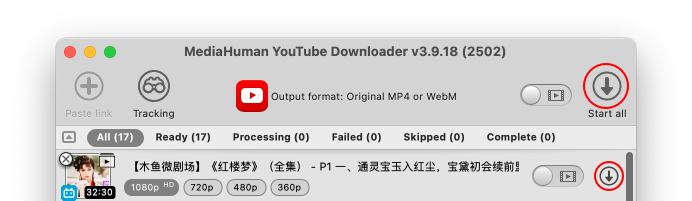
Open YouTube Downloader and paste the link with Ctrl+V or ⌘+V. The program reads the Bilibili page and shows the video title and thumbnail. For multi-part videos, every part shows up as a separate line in the list.

-
Pick quality and save
Choose a format from the dropdown - MP4, MKV, or others. Bilibili typically offers 360p, 480p, 720p, and 1080p. Go with Original MP4 if you want the highest quality without re-encoding. Then press the download arrow or Start all.
Fair warning - Bilibili's CDN can be slow outside Asia, so larger videos may need a bit of patience.

-
Done
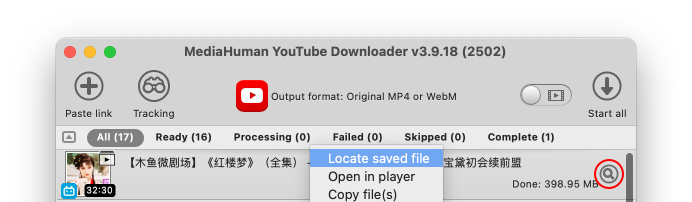
Once finished, the downloaded file will be waiting in your output folder. To open it right away, click the Locate button or right-click the entry and select Locate saved file.


Tip: Multi-part videos
Many Bilibili creators split long content into parts (P1, P2, P3...). When you paste a link to such a video, the program lists all parts automatically. Each one downloads as its own file with the part title in the filename.