 French
 German
 Italian
 Spanish
 Russian
 Turkish
 Portuguese
 Japanese
 Dutch
Dutch Polish
 Korean
 Chinese (Simplified)
 Chinese (Traditional)
How to download a Spotify playlist to MP3
Spotify is one of the most popular music streaming services around, but it keeps every playlist locked inside its own app - streamed tracks are DRM-protected, so there is no built-in way to save them as MP3 files you actually own.
Our YouTube to MP3 Converter works around this: paste any Spotify playlist link and the app reads the title and artist of every track, then finds and downloads a matching version of each song - from YouTube for free users, or Deezer for Premium users for a closer-quality match - saving the whole playlist as MP3 in one go. Here is a quick step-by-step guide.
This tutorial is written using the Mac version of the program, but the steps are the same for Windows and Linux.
-
Copy the Spotify playlist link
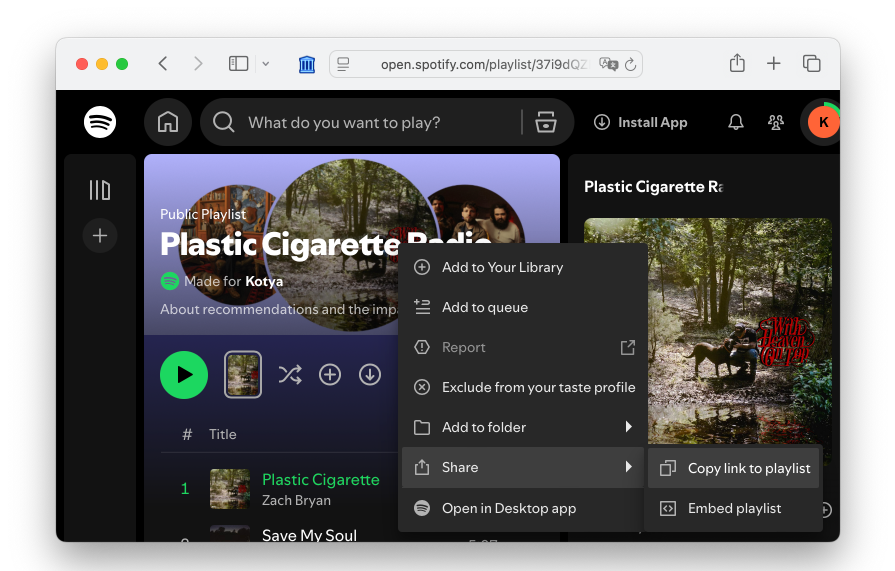
Open the Spotify playlist you want to convert in your browser or the Spotify app, then tap Share → Copy link to playlist.
-
Paste the link
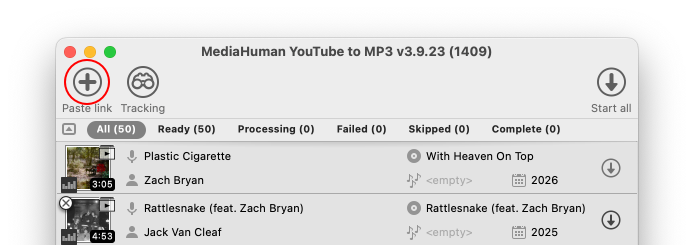
Download and run our program if you have not already done so, and click the Paste link button on the toolbar. The app recognizes the playlist and reads the title and artist of every track, automatically finding the matching audio — from YouTube for free users, or Deezer for Premium users for a closer-quality match — and adds all of them to the download list.
-
Start the download
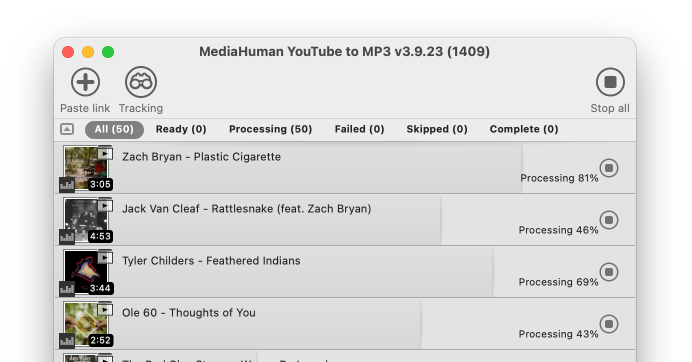
Now click the Start all button to download every track from the playlist, or start individual tracks one at a time if you only need a few.
-
Done!
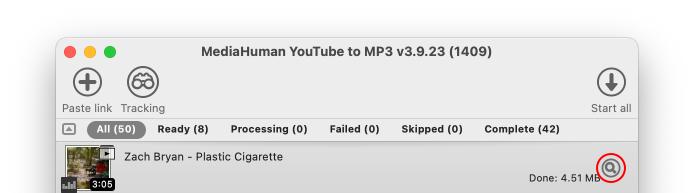
Wait a bit and enjoy your freshly downloaded playlist. Downloaded files are available directly in the program — just click the Locate button next to any track, or press ⌘+J on Mac or Ctrl+J on Windows to open the Downloads folder.


Tip: make sure the playlist is public
The app can only read playlists that are public or set to "Anyone with the link" - Spotify blocks access to fully private ones, so double-check the sharing setting if the link does not load.