 French
 German
 Italian
 Spanish
 Russian
 Turkish
 Portuguese
 Japanese
 Dutch
Dutch Polish
 Korean
 Chinese (Simplified)
 Chinese (Traditional)
How to download and save all videos from Watch Later playlist as MP3.
YouTube's Watch Later feature lets you conveniently save videos to watch at a later time, using a playlist. Our application will help you to download all videos from this playlist, and save them as MP3.
-
Download and Install
Download and install the latest version of MediaHuman YouTube To MP3 Converter. It's available for Windows, Mac OS X and Ubuntu/Linux.
-
Authorization details
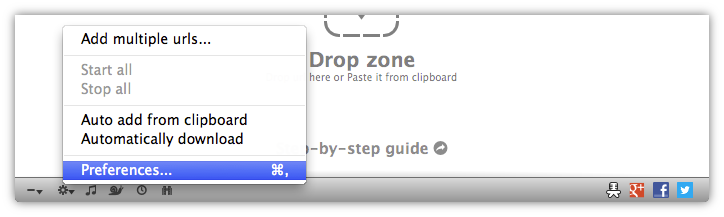
Open app's Preferences in the bottom-left corner of the window.
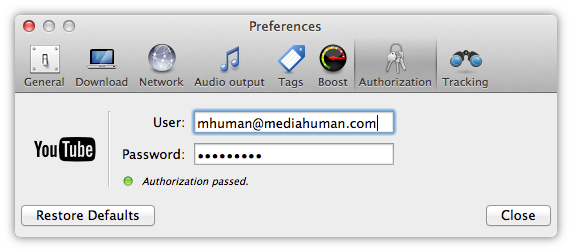
Switch to Authorization tab and fill in your YouTube login details. Ensure that authorization passed and the light turned green.
-
Copy the link of playlist
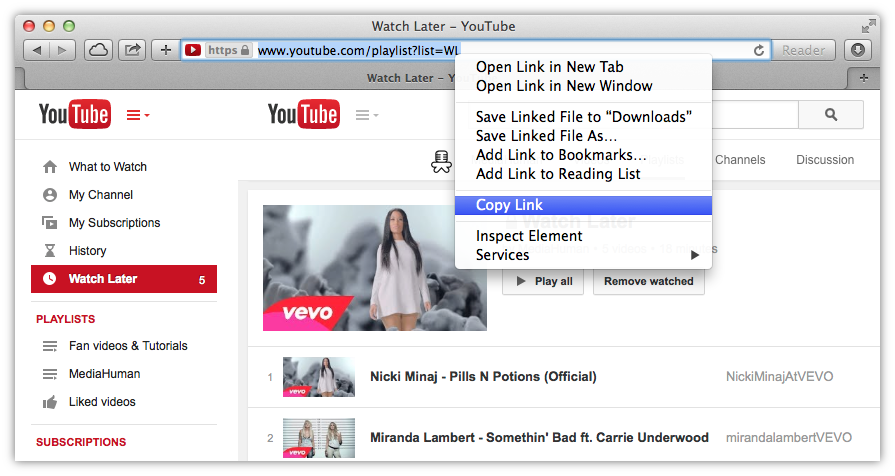
Open your favorite browser and navigate to YouTube website then open your 'Watch Later' playlist. Now you should copy its link to the clipboard. Right-click the address bar of your browser and select the appropriate command.
-
Paste link
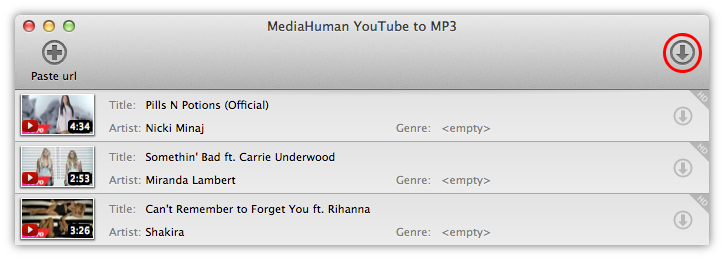
Paste the link into YouTube To MP3 Converter application by pressing highlighted button on the toolbar. Alternatively, you can simply drag&drop the URL from your browser to the program.

-
Ready to download
We are ready to download YouTube clips now! Click the Start all button, and all videos from the download list will be saved locally and converted to MP3. You can also add other individual videos or playlists to the download list. Note that the downloading process goes in background, so you can keep adding clips while other videos are being downloaded from YouTube.
You can download from your own private playlists, Liked videos and Favorites playlists in the same way.