 French
 German
 Italian
 Spanish
 Russian
 Turkish
 Portuguese
 Japanese
 Dutch
Dutch Polish
 Korean
 Chinese (Simplified)
 Chinese (Traditional)
How to download mixes from Mixcloud in MP3 format on Mac and PC.
Mixcloud is a fairly popular streaming service from London, with a huge amount of music, radio shows and podcasts. We're not sure why DJs fell in love with it, but a lot of recordings are posted there before they're available anywhere else. The creators of the service initially decided not to let users download tracks they liked and listen to them offline, but we'll put this irritating injustice right.
This tutorial was created using the Mac version of the software, but the steps are the same for Windows and Linux.
-
Find the song you like
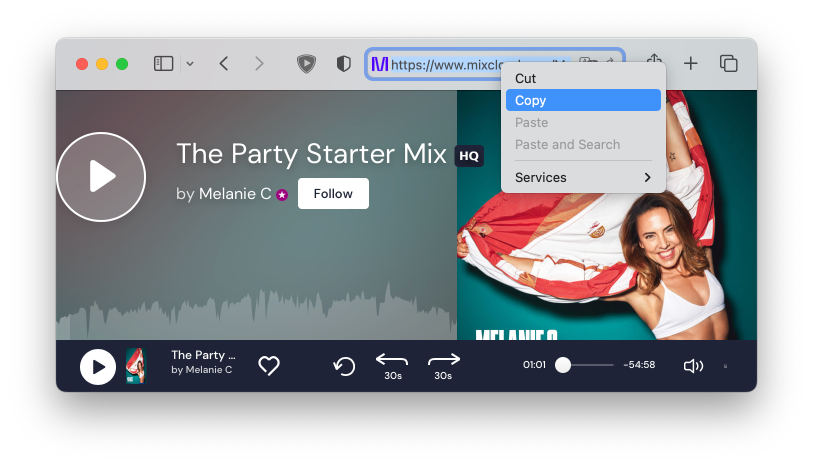
Open the Mixcloud track you want to download in your browser and copy the link to it to the clipboard.
-
Pasting the link
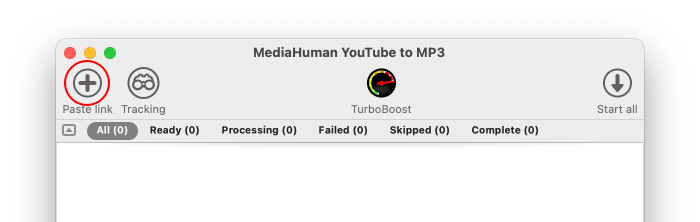
Run the downloader app and click the Paste link button on the toolbar. The program will download the required information about the track from Mixcloud servers and displays it in the list of downloads. It also tries to parse additional metadata like coverart and genre.
-
Start downloading
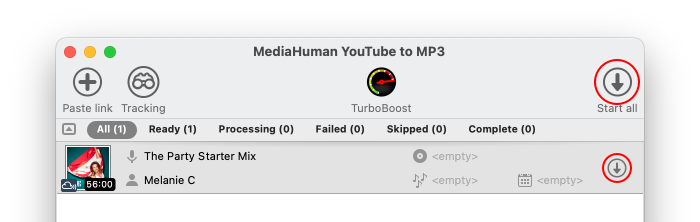
Now click the Start button and the program begins downloading the selected song. If the download list contains multiple tracks, you can click the Start all button instead.
-
Done!
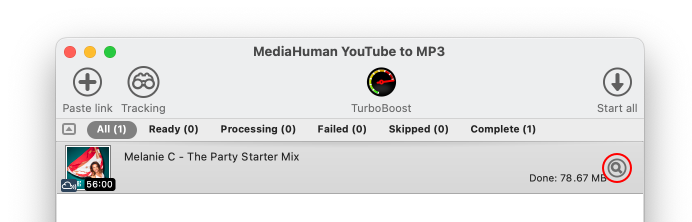
Wait a little bit and enjoy your freshly grabbed songs downloaded from Mixcloud. Downloaded files are available directly within the program – simply click the Locate button next to the selected track.


While our program allows you to download songs from Mixcloud, we strongly encourage you to support the artists who create this music by purchasing their music or attending their concerts. This will help them continue the creative process and produce more quality music that inspires and delights us all.