French
 German
 Italian
 Spanish
 Russian
 Turkish
 Portuguese
 Japanese
 Dutch
Dutch Polish
 Korean
 Chinese (Simplified)
 Chinese (Traditional)
How to automatically download MP3s from updated YouTube channels and playlists
If you have a favorite YouTube music channel then a brilliant idea should have already stroke you – it would be great to automatically download and save all new songs from it. So we added a new function to our program – Track channel.
-
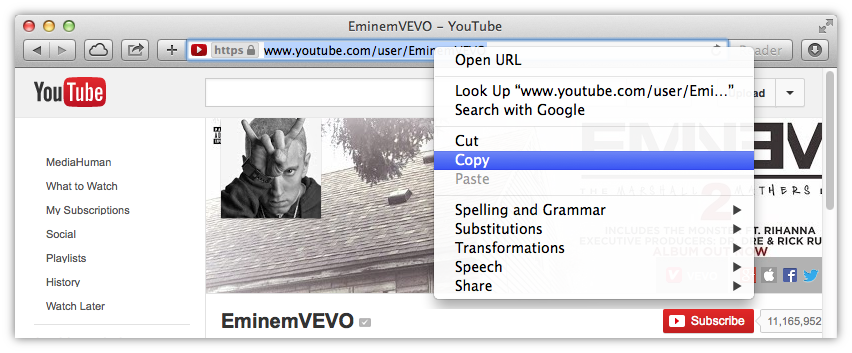
Copy the link
Open your favorite YouTube channel or playlist and copy the link to it into the clipboard.
-
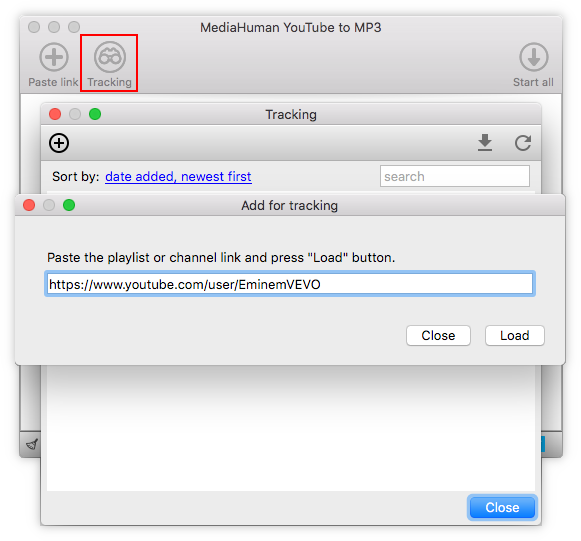
Paste link into the program
Paste the link and click the Load button. The program will download all necessary information about the channel.
-
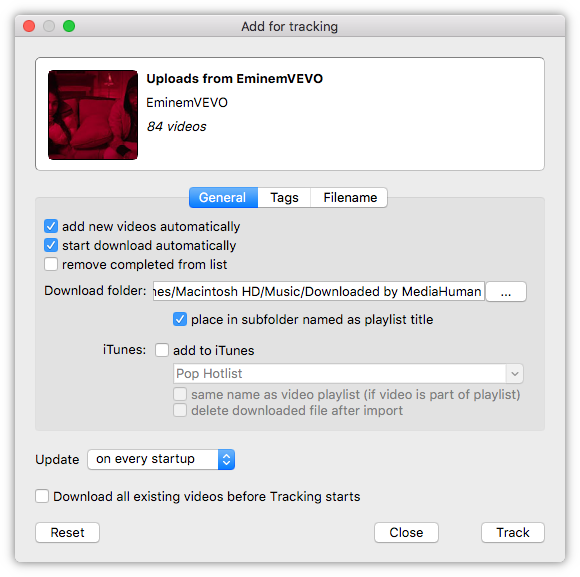
Select additional options
Now you can configure additional options, such as automatic adding to the download queue, changing the destination folder, specifying the playlist and update period. On the picture below we selected the adding option, so all new tracks will be automatically added to the download queue upon next check.
-
Subscribe the channel
Click the Track button to subscribe all updates of this channel.
-
Done!
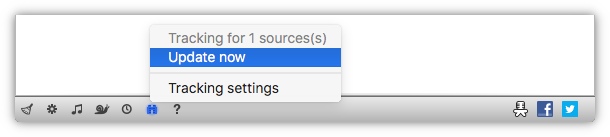
The status bar icon displays that the channel tracking function is active. You can also refresh channel information manually using the menu.